« November 2007 | Main | January 2008 »

December 2007

December 26, 2007

(FireGPG) Browser-based XSS

FireGPG is a Firefox extension which brings an interface to GPG functions. It's capable of signing, verifying, encrypting and decrypting text on the fly using GnuGPG.

It also integrates with Gmail, making it possible to run GPG functions on mail messages. One of its features is auto-verification of mail messages, which are detected as PGP-signed.

After a mail message has been verified, it is printed below the message whether the signature matches the message and if it does, issuer name is printed as well.
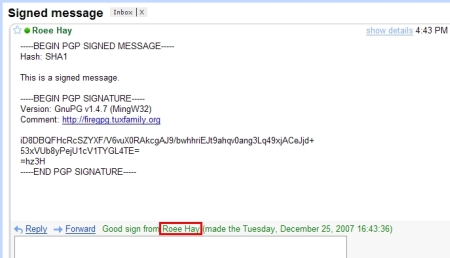
However (in version 0.46), the issuer name is not sanitized or validated against malicious input, so it makes FireGPG vulnerable to Cross Site Scripting. If the issuer name (which is provided with the public key) contains a malicious JavaScript, it will be executed under Gmail's context!. An XSS under Gmail allows the attacker to impersonate to the victim by controlling his mailbox, steal his cookies and so on.

To exploit this vulnerability, the attacker sends the victim a message signed with his malicious PGP key, and then convinces him to import the attacker's public key block  (which contains the malicious issuer name). The key can be imported manually, or by using a public key repository. It is reasonable that the victim will not notice the malicious issuer name since public keys are usually distributed as base64 blocks, or identified by their Key ID when retrieved from a public key server. Once the victim views the signed message in his mailbox, FireGPG will automatically verify it and inject the malicious payload into Gmail's DOM, which is immediately  executed. The screenshot below illustrates an injection of a javascript into Gmail's DOM by setting the issuer name to "<script>alert(document.domain)</script>"
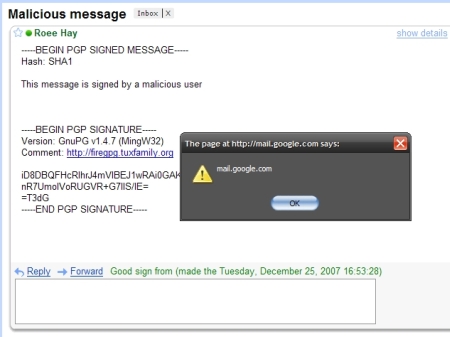
 

This type of XSS is interesting because a browser bug leads to an XSS. it is both similar and dissimilar to DOM-based XSS.  It resembles to DOM-based XSS because the attack cannot be detected by the affected domain. But unlike DOM-based XSS, flaws of this variant are not originated from the developers of the affected domain.

Looking at FireGPG's case, Gmail is not responsible for the flaw, yet the XSS occurs under its DOM. Looking at Yair Amit's last post, the website which an HTML file is downloaded from is not responsible for the XSS, Internet Explorer is.

It should be noted that FireGPG's team has been very responsive and it took them  about 21 hours since our disclosure to provide a remedy to the flaw. This shows they are security aware and are committed to the protection of their end-users. It is an excellent example of how to handle security related bugs correctly. Many vendors do not distinct security bugs from other bugs, IMHO this is a bad approach - security related bugs should be fixed as soon as possible, and not in the next service pack.
December 23, 2007

Internet Explorer Download Zones Mix-up leads to XSS

Do you worry about security when downloading and opening HTML files from the Internet? I've been asking around over the past few days, and most people seem to feel they can rely on IE's My-Computer zone security restrictions to keep safe.

A few days ago, I discovered a security flaw in Internet Explorer that could - under certain conditions - be exploited against a large number of web-applications. The flaw results in XSS holes in websites that allow the downloading of user-controlled HTML files (for example, webmail and forum services). The websites themselves don't necessarily do anything wrong. Their susceptibility to attack is due to improper behavior by Internet Explorer.

Same Origin Policy is supposed to ensure that once HTML is downloaded to the user's machine and opened locally, it can no longer access, or pose a threat to the source website – as it is no longer affiliated with that website's domain. Relying on browsers to apply this policy, websites frequently allow users to download original, unaltered versions of attachments, to their local-systems. Usually that's fine, but it seems that there is a download scenario in IE that does not follow this guideline.

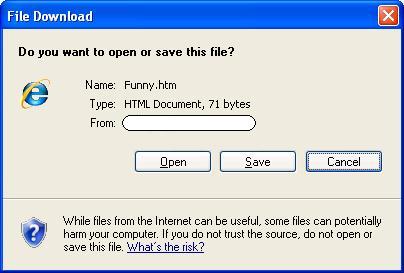
It turns out that if you download an HTML file via IE and click the "Open" button in the "File Download" dialog (a fairly common scenario), instead of IE displaying the content from the local hard-drive (in the My-Computer Security Zone, which is very restrictive by default) the HTML is displayed in the context of the domain from which the file was downloaded. This behavior is neither expected nor desired.

If the downloaded HTML file contains a malicious JavaScript code, it will automatically be executed by Internet Explorer in the context of the original website. The risks this problematic behavior poses to IE users are equivalent to those of XSS. Since the problem lies with Internet Explorer and not any specific website, the risk to users is widespread. In effect it makes a large amount of websites susceptible to XSS to some extent.
In order to better describe the problem, let's consider the case of webmail services. Most webmail services offer a preview feature that allows the user to view an HTML version of attachments. The generated HTML is scanned and sanitized in order to ensure that it doesn't contain hazardous characters when embedded within the site.

The same principle is applied to HTML attachments. When they are viewed in the context of the web-application, all potentially harmful content (such as scripts) is stripped. While these measures protect users from security threats such as XSS, the design and functionality of the HTML attachment file might be damaged as a result, and for this reason webmail services offer a "Download" feature that lets the user download the original content of the attachment. Surfers can – and frequently do – use the "Download" feature when the sanitized version of the attachment is not satisfactory. This fact might be taken advantage of by a malicious attacker trying to exploit the aforementioned flaw.

While people are already educated to be suspicious of opening executable attachments, most people (and perhaps technical people in particular) are likely to open HTML attachments rather freely. HTML attachments are perceived as being with very small risk thanks to the My-Computer Zone protection mechanisms embedded in Internet Explorer. I therefore believe that despite the generic warning displayed in IE's "File Download" dialog (see "Flow of attack" section below), IE's improper behavior could be used by malicious attackers to mount attacks against visitors in a variety of web applications.

Microsoft was notified about the problem, but decided to not flag it as a security threat that has to be fixed, relying on the general warning message embedded in the "File Download" dialog.

For the reasons I described above, I believe it is important to warn users about this flaw, in order to help to mitigate the risk it poses to potential victims.

A brief review of several popular web-applications (forum infrastructures and webmail services) has shown that the flaw described above is fully exploitable in many of them. Until this flaw is fixed, IE users are potential victims when visiting and downloading attachments in web-applications of this type.

Vulnerable web-applications can protect their users by ensuring that the domain from which files are downloaded is different to that used by the code logic of the application itself. However, since this change isn't trivial, it's likely that many websites will remain vulnerable in the near future.

I therefore recommend thinking twice before opening HTML attachments with the "Open" button in Internet Explorer.

Flow of attack:

  1. Victim receives an HTML attachment and decides to download it in order to watch it properly.
  2. Victim clicks on the "Open" button.
    File Download Dialog 
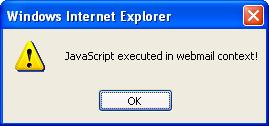
  3. The HTML is displayed by Internet Explorer in the context of the source website. JavaScript embedded in the downloaded HTML file has full access to the resources of the source website, and can fully impersonate the victim on the source website while she/he is calmly viewing the supposedly innocent HTML attachment.
    XSS Pop up

December 03, 2007

"Analyzing the Effectiveness and Coverage of Web Application Security Scanners" - Take II

The following is an overview taken from my whitepaper that discusses Larry Suto's recent paper "Analyzing the Effectiveness and Coverage of Web Application Security Scanners".

Suto's paper, as you may or may not know, caused some stir in the industry, which got some of us busy doing our own analysis to rebut some of its findings and methodology.

In October 2007, Larry Suto published the whitepaper "Analyzing the Effectiveness and Coverage of Web Application Security Scanners". The paper, attempted to quantify the effectiveness of automated web application scanners, and in particular he compared between NTObjective's NTOSpider, HP (SPIDynamics) WebInspect, and IBM Rational AppScan.

Larry's comparative work attempted to analyze the effectiveness of the scanners in four areas:

  1. Links crawled by the scanners' web crawler
  2. Coverage of application code (tested using Fortify's Tracer tool)
  3. Number of verified vulnerabilities that were found
  4. Number of false positives

The paper's conclusion showed a large discrepancy in the number of vulnerabilities detected by WebInspect and AppScan, to those detected by NTOSpider, and in addition it seemed as if WebInspect and AppScan missed a large amount of vulnerabilities (i.e. False Negatives).

My overview, which is presented in this paper, will attempt to shed some light on the results presented in Suto's paper, as well as to rebut its accuracy.

This paper will show that there are fundamental flaws in the original report:

  1. The findings are not appropriate for comparison purposes, as they compare numbers from products that are measuring vulnerabilities at different levels of granularity (i.e. Apples and Oranges).
  2. The methodology used in the original whitepaper is questionable, because it wasn't fully explained.
  3. After requesting information about the test environment and AppScan scan files from the author, our own experiments produced significantly different results from those published in the whitepaper.

      The entire whitepaper is available for download here: [Better Untaught Than Ill-Taught]

      You can find the original whitepaper written by Larry Suto here.

      You should also check out a similar analysis paper written by Jeff Forristal (HP/SPI), that was published a few weeks ago.